Time to value: measure the wait for a useful result
Define time to value, keep non-completers visible, and break the wait into actionable stages. Learn why a faster median can coexist with a worse completion rate.
The ClickClacks team · 6 min read
On this page 8 sections
- Define a result that belongs to the user
- Pick a start that makes the wait interpretable
- Pair completion share with elapsed time
- Show enough of the distribution
- Break the wait into intervals you can investigate
- Check the data before shortening the experience
- Choose a change that preserves value
- Keep the reporting definition stable
Time to value measures the elapsed time between a chosen starting point and a useful outcome for the customer. In a SaaS product, that might be the time from workspace creation to opening a report built from the customer’s own data. It is useful only when the start, outcome, and population are explicit.
Report it alongside the share of users who reach that outcome. A median calculated only among successful users can get faster while more people fail to finish. Those two facts can coexist, so a faster number alone is not enough to judge the onboarding experience.
This guide uses a fictional reporting product and original illustrative numbers. It focuses on measuring first operational value, not the longer process of proving financial return on an investment.
Define a result that belongs to the user
“Finished onboarding” is often a product-team label. Replace it with something observable that represents the user’s job. In our example, “opened a report containing at least one valid row from their own connected source” is more specific than “visited the dashboard.”
A sample report may help someone understand the interface, but it is not the same outcome as a report using their own data. Track sample exploration separately if it matters. Otherwise a demo shortcut can appear to improve time to value without getting customers closer to the result they need.
Confirm the definition with people who use the product. Ask what they were trying to learn from the report and whether opening it was actually enough. The goals-to-metrics approach is a useful discipline here: begin with the desired user outcome, then choose an observable signal and measurement.
Pick a start that makes the wait interpretable
Starting the clock at account creation includes time spent waiting to connect a source. Starting at source connection measures a narrower processing and setup experience. Both can be useful, but they answer different questions.
For the main measure, use workspace creation because the team wants to understand the whole initial experience. Also record intermediate timestamps: source connected, first valid data received, and report opened. Those let you decompose the wait without redefining the headline metric every time you investigate it.
Choose elapsed wall-clock time for this example. That includes overnight pauses and weekends. If your team also measures active task time in usability sessions, give it a separate label. Five minutes of active work spread over three calendar days is a very different experience from five minutes immediately after sign-up.
Pair completion share with elapsed time
Take 100 eligible new workspaces and give each seven days. Suppose 60 reach the useful report outcome. Among those 60 completers, the median elapsed time is two hours. The honest readout is “60% reached value within seven days; median time among completers was two hours.”
The other 40 are not zero-hour completions. They did not reach the outcome within the observation window. Some might do so later, which can be measured in a longer follow-up, but they remain non-completers in this seven-day metric.
Now imagine a later cohort of 100 workspaces where only 40 finish, with a one-hour median among completers. The successful group is faster, but the completion share fell from 60% to 40%. You would not call that an unqualified improvement.
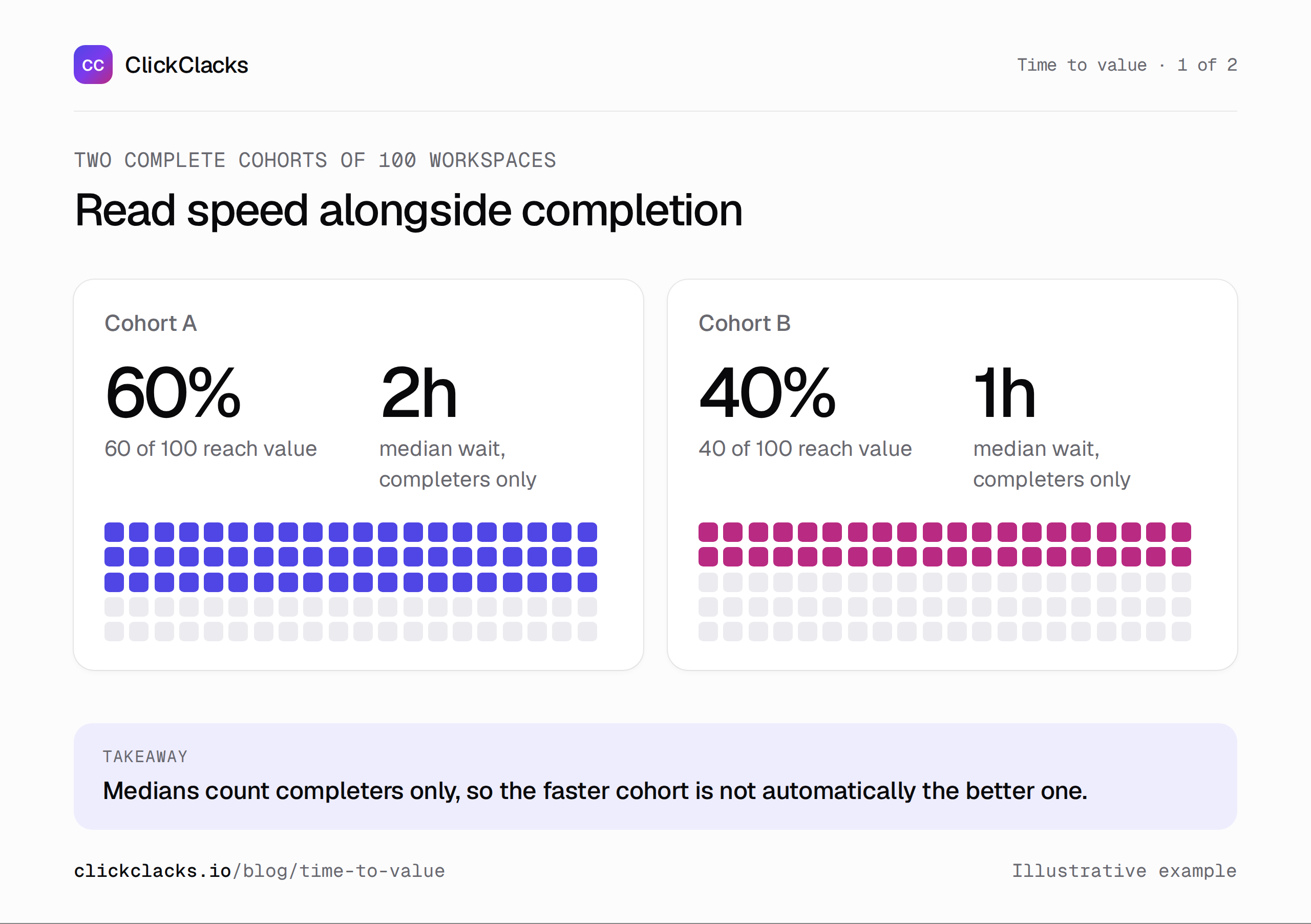
Both cohorts have 100 eligible workspaces and a full seven-day window. Medians include completers only.
Show enough of the distribution
A median describes the middle completing workspace. It does not show whether a substantial group waits much longer. Add a later percentile or a small histogram when you have enough observations and the collection is reliable.
For a simple illustration, suppose five workspaces complete after 1, 2, 3, 10, and 20 hours. The median is 3 hours and the mean is 7.2 hours. The two long waits affect the mean substantially. Neither summary is a mistake; they emphasize different aspects of the same experience.
With very small samples, show the actual durations or broad counts instead of presenting a precise-looking percentile as stable evidence. Always identify whether a duration summary describes all entrants or only those with observed completion. This funnel interpretation reference explicitly scopes time-to-convert reporting to converters.
Break the wait into intervals you can investigate
For one illustrative workspace, creation to source connection takes 18 hours. Source connection to first valid data takes 2 hours. First valid data to report opening takes 4 hours. Total elapsed time is 24 hours.
Those intervals suggest different questions. The first may involve credentials or an unavailable administrator. The second may involve processing. The third may involve whether the user knows the report is ready. A single average onboarding time cannot tell you which wait your team can influence.
Do not add the median duration of each stage and label the result the median total. Different workspaces can occupy the middle of each stage’s distribution. Calculate the total for each workspace first, then summarize those totals.
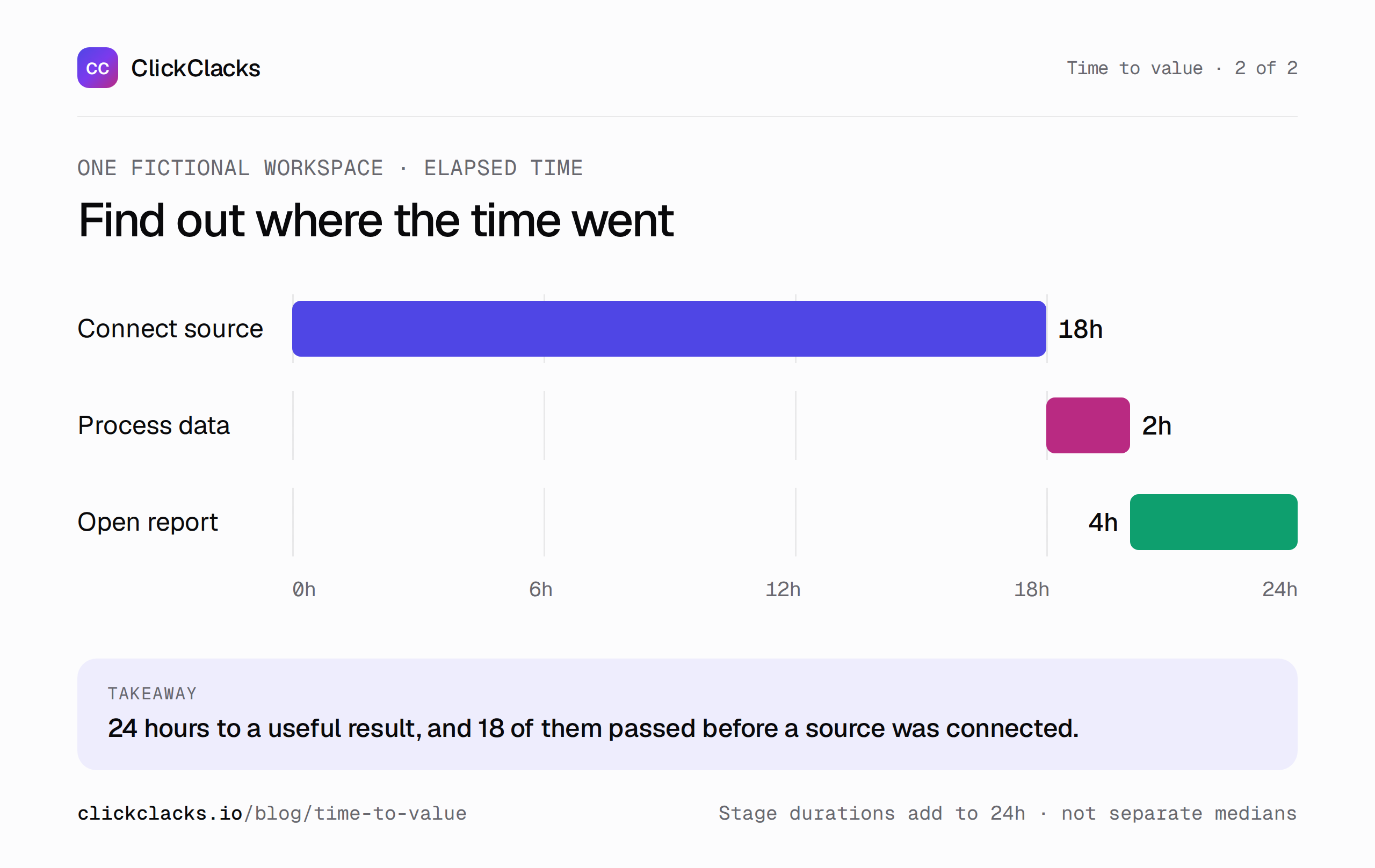
This is one workspace’s elapsed timeline, not the sum of independently calculated medians.
Check the data before shortening the experience
Validate that the start and finish belong to the same workspace. A teammate opening the report may complete an account-level outcome even if the creator never returns. If you accidentally require the same person at every stage, a collaborative success can look like a failure.
Use timestamps that represent when actions occurred, and check how delayed ingestion is handled. Investigate negative or implausibly large intervals. They can come from clock issues, reused identifiers, imports of historical records, or a finish event paired with the wrong start.
Exclude internal tests with a stable rule, but keep genuine slow customers in view. Removing long durations simply because they make the average inconvenient hides the experience you are trying to improve. If there is an exclusion for corrupted records, document the reason and count.
Choose a change that preserves value
If source setup dominates the wait, consider clearer prerequisites, a safer credential handoff, or a way to show what is needed before someone starts. If processing dominates, investigate technical work. If users do not notice completion, a useful notification may be more relevant than rearranging the onboarding checklist.
Evaluate the change with both completion share and elapsed time. Also verify that the resulting report is usable: skipping validation could make the report appear sooner while producing incorrect output. Speed is a constraint on delivering value, not a substitute for it.
Segment by meaningful setup differences. A workspace connecting a small file and one configuring a complex integration may deserve separate expectations. Avoid a universal benchmark that treats their prerequisites as equivalent.
Keep the reporting definition stable
Write down the starting event, finish condition, entity, time unit, observation deadline, exclusions, and whether the duration includes non-working hours. Put the completion denominator beside the time summary. Compare complete cohorts with the same definition.
Funnels can help structure the path to the outcome. Depending on the calculations your tool supports, compute the duration distribution in an authorized export or spreadsheet. Do not assume that every funnel interface provides every timing statistic described here.
At the review, state the problem in terms of the wait you observed: “Many workspaces spend most of their first day waiting for source access.” That is a useful starting point for a change. “Our median got faster” is only the beginning of the interpretation.
Keep reading
All posts
Analytics6 min read
Activation rate: choose the milestone before the metric
Define a meaningful activation milestone, calculate a cohort rate, and handle incomplete observation windows with practical examples for a SaaS product team.
Analytics6 min read
Product engagement metrics for a weekly team review
Choose meaningful activity, frequency, and participation metrics for a focused weekly review. Use clear definitions, quality checks, and an accountable next action.
Analytics6 min read
Customer retention metrics: separate users, accounts, and revenue
Separate user activity, account retention, and recurring revenue with worked examples. Calculate gross and net retention while keeping new-customer revenue out.