User onboarding analytics: find where new users get stuck
Find the onboarding step that prevents activation, reproduce a worked funnel with sample events, and separate pending users from real drop-offs.
The ClickClacks team · 10 min read
On this page 12 sections
- Separate required steps from optional setup
- Build a small, reproducible funnel
- Reproduce the counts before choosing a fix
- Separate pending workspaces from expired windows
- Look at what happens around the weak step
- Use properties to narrow the problem
- Confirm the experience directly
- Check instrumentation before changing the flow
- Reproduce the example in ClickClacks
- Count workspaces when teammates share the work
- Choose one change with an expected result
- Make the next review easy to follow
User onboarding analytics should help you find what prevents a new user from completing a useful first task. Begin with an outcome, map the required steps, and use the actual paths people take to investigate where that route breaks. Completing an onboarding checklist is only valuable if it helps the user do the job they came for.
You do not need to track every interaction to start. You need reliable success events for the important transitions, a way to recognize the same person or account across them, and enough context to distinguish a failed attempt from a deliberate pause.
We will use a fictional file-import app. Its first useful outcome is opening a dataset built from the user’s own file. All counts below are illustrative. The workflow can be adapted to a local test app or an existing event dataset without changing production behavior.
Separate required steps from optional setup
Draw the shortest valid route to the outcome: create a workspace, submit a file, complete a successful import, and open the dataset. Profile photos, teammate invitations, and newsletter preferences are optional for this job. Putting them in the required funnel would count valid shortcuts as drop-offs.
Also list alternate valid routes. A user may import through an API instead of the browser, or join a workspace with an existing dataset. Decide whether those users belong in this particular onboarding analysis. Separate them when their route is materially different.
Build a small, reproducible funnel
Choose a cohort and a window. In our example, 160 new workspaces each receive seven days to open their first imported dataset. Exclude internal test accounts using a rule chosen in advance, and wait until every workspace has had the full window.
Of those 160, 120 submit a file, 72 complete a successful import, and 60 open the resulting dataset. The overall completion rate is 60 divided by 160, or 37.5%. The weakest step by absolute loss is between file submission and import success: 48 workspaces do not progress within the window.
That is where to investigate first, not a complete explanation of what happened. Some people may have uploaded unsupported files, canceled a job, left before processing finished, or encountered a collection bug. The funnel gives you a bounded group to inspect.
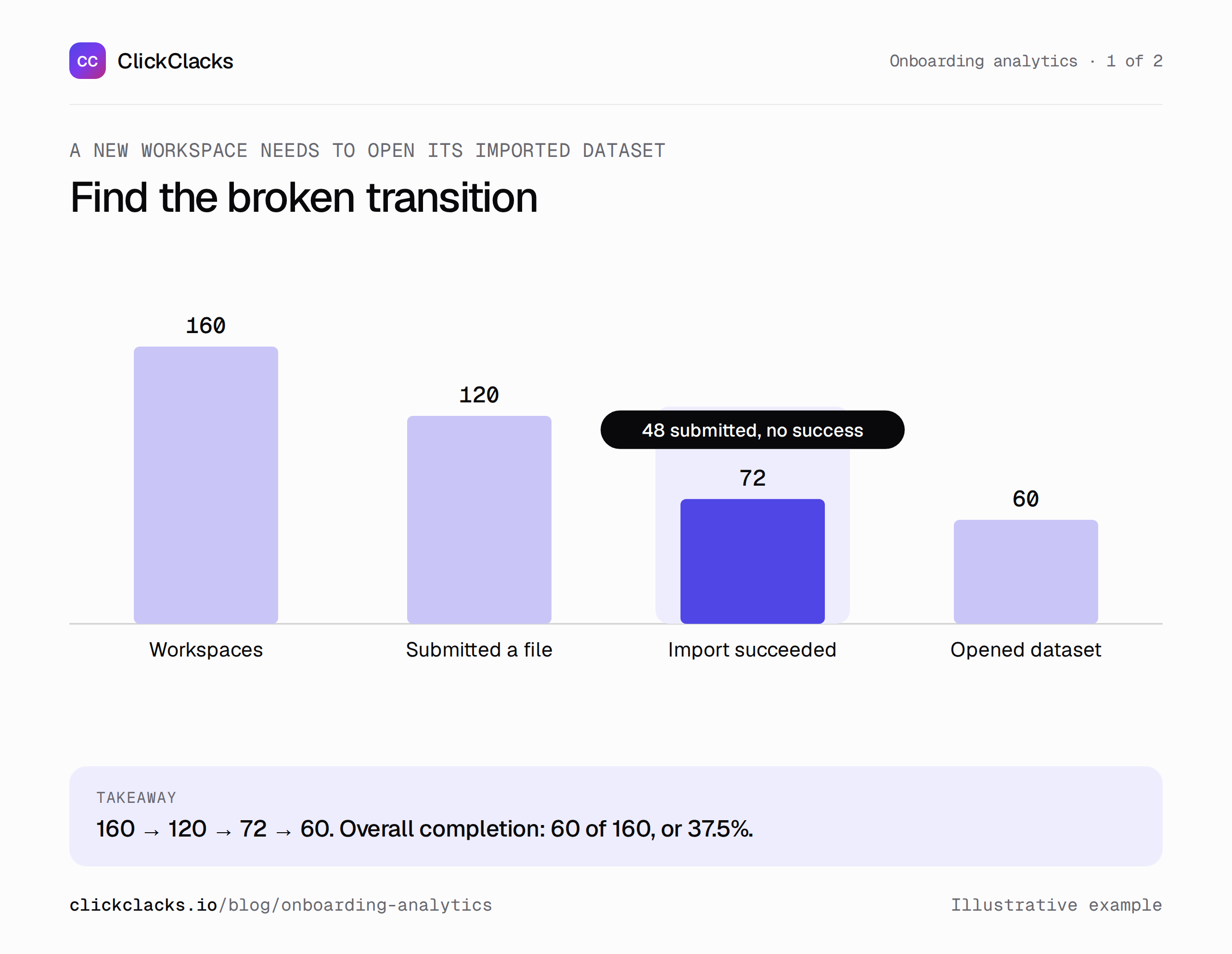
One starting cohort, one seven-day window, distinct workspaces at every step.
Reproduce the counts before choosing a fix
The sample gives each workspace exactly one person, so person and workspace counts agree. That shortcut rarely holds in a team product: one teammate may upload while another opens the dataset. Choose account counting when the question is whether a workspace activated, and keep the account identity consistent across every event.
Workspace created: emit after the workspace has been saved.
File submitted: emit after the app accepts the file for processing.
Import succeeded: emit after processing completes successfully.
Dataset opened: emit when the resulting dataset is displayed.
Download the synthetic event data and verification script into one folder. With Node.js installed, run the command below. These are local teaching files, not an ingestion payload; they make no network calls.
node verify-onboarding.mjs onboarding-events.jsonThe finished-window cohort returns 160 → 120 → 72 → 60. The script also checks the recovery branches and the pending entrants described below. If you adapt the events, update the expected totals only after reconciling the new records. The activation-funnel walkthrough shows the ClickClacks settings and expected results.
Separate pending workspaces from expired windows
A workspace created yesterday has not yet failed a seven-day activation goal. At a fixed observation cutoff of October 1, 2026 at 12:00 UTC, our original 160 workspaces, created September 20, have all had their week. Of those, 60 finished and 100 did not.
Now add 40 workspaces created September 29. Ten have already opened a dataset; 30 have not submitted a file yet. Overall conversion becomes 70 / 200 = 35%. The finished-window cohort is still 60 / 160 = 37.5%. The difference comes from the time available to the entrants, without any change to the original cohort.
Report the observation cutoff with the conversion window. A historical date range can end before someone’s seven days are up even if those days have passed by the time you read the report. In ClickClacks, the funnel window labels distinguish expired windows from windows that run beyond the report dates.
Look at what happens around the weak step
Now examine the paths after file submission. Suppose 30 workspaces receive a validation error first. Twelve of those correct the file and eventually complete an import; 18 do not. Another 60 workspaces complete without a recorded validation error. Together, the 12 recovered workspaces and 60 direct successes explain the 72 successful imports.
The remaining 30 submitted workspaces have no successful import and no recorded validation error. Do not label them “confused.” Their unresolved state could include canceled jobs, processing failures, missing events, or people who intentionally stopped. Break that group down with job-status evidence before drawing a UX conclusion.
Keep units consistent in this path view. Thirty workspaces encountering an error is different from thirty error events; one workspace may trigger several errors. For the worked example, branches are based on each workspace’s first relevant outcome so their counts can be reconciled.
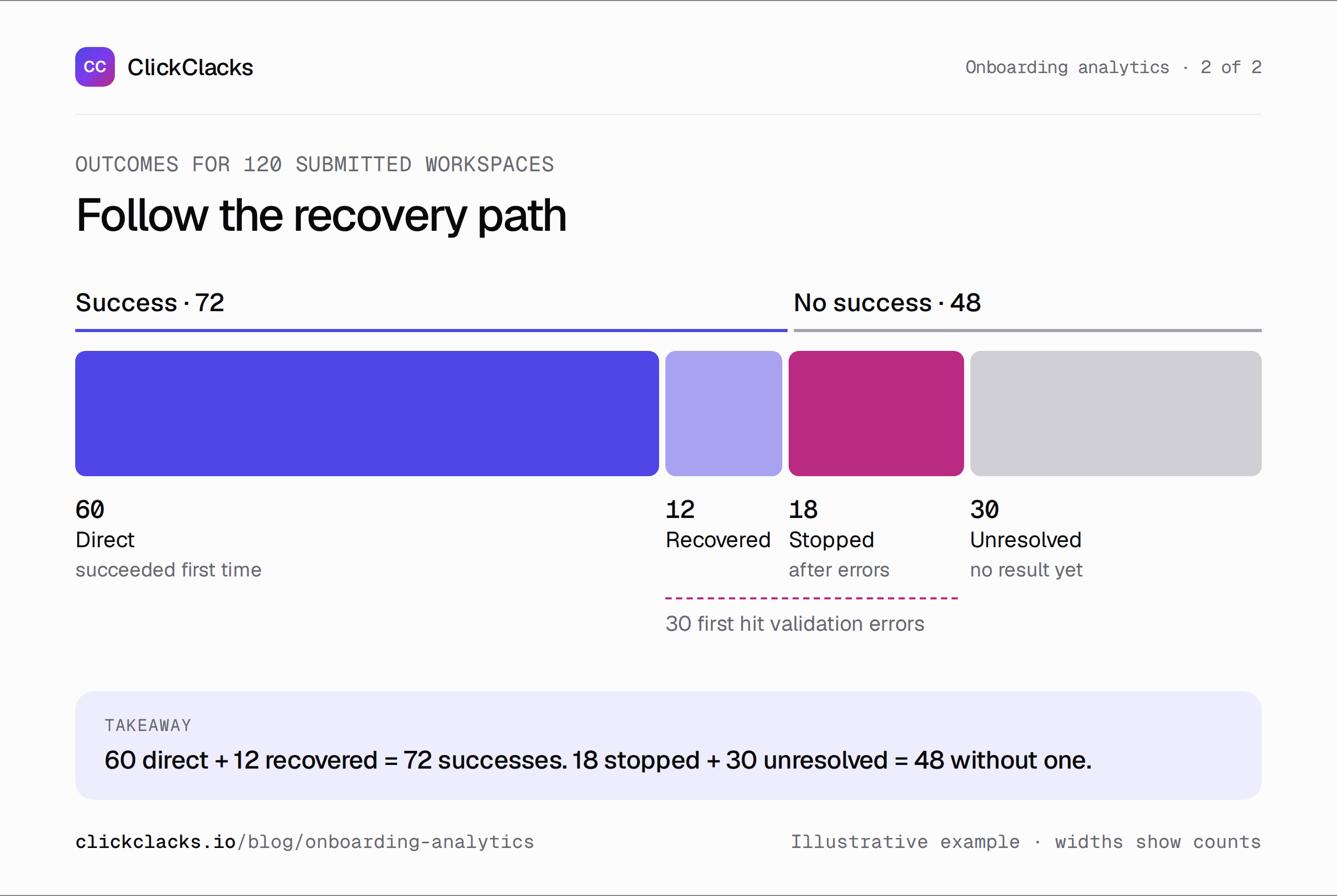
The 72 successes include 12 recoveries. Error encounters and eventual successes overlap.
Use properties to narrow the problem
Capture a bounded error category, file type, and application version. These can help you distinguish a format-specific problem from a general onboarding issue. Avoid storing raw file contents or unrestricted error messages in analytics just to make a breakdown convenient.
Suppose the unrecovered validation errors mostly concern missing column headers. That gives you a specific investigation: are the requirements visible before upload, and does the error message show a usable example? It does not justify redesigning every screen in the onboarding flow.
Break down one plausible cause at a time. Device type might matter for a drag-and-drop uploader. User role might matter for permissions. Acquisition source is less helpful if it does not change the explanation or the action you would take. Many small slices can produce attractive but fragile stories.
Confirm the experience directly
Reproduce the error with a safe fixture in a local or test environment. Read the message, try the recovery path, and verify that the corrected file reaches a successful result. If the product requires a particular header, test a missing header and an incorrect header separately.
For questions about intent, ask users who have agreed to talk. A behavior path can show that someone opened the help panel and left; it cannot establish whether the help was confusing, the task was postponed, or an unrelated interruption occurred.
You can learn plenty from event paths, error categories, and direct usability testing. Do not assume that this workflow requires a replay recording or that a path chart reveals everything a person saw. Keep the observation and your interpretation separate in the investigation notes.
Check instrumentation before changing the flow
Run through the route with a test workspace and compare the application’s state with the event sequence. A completed background job should produce one success event tied to the same workspace and import job as the submission. Reloading the result page should not create a second import success.
Check identity transitions around sign-in and invitations. If events before and after authentication appear under unrelated identities, a report can manufacture a drop-off that never happened. Also confirm whether queued events use occurrence time or ingestion time in the analysis.
For the unresolved group, compare with an authoritative job-status record where access is authorized. If many jobs succeeded but their analytics events are missing, the immediate task is repairing measurement. A more persuasive empty state would not fix that discrepancy.
Reproduce the example in ClickClacks
The hands-on walkthrough includes a downloadable Node.js sender, real product screenshots, and the exact funnel settings. Run it in a dedicated test project. It generates 582 synthetic events with fresh timestamps, validates them, and sends them through the server API. Prepare and send within five minutes so the oldest events stay inside the seven-day ingestion limit.
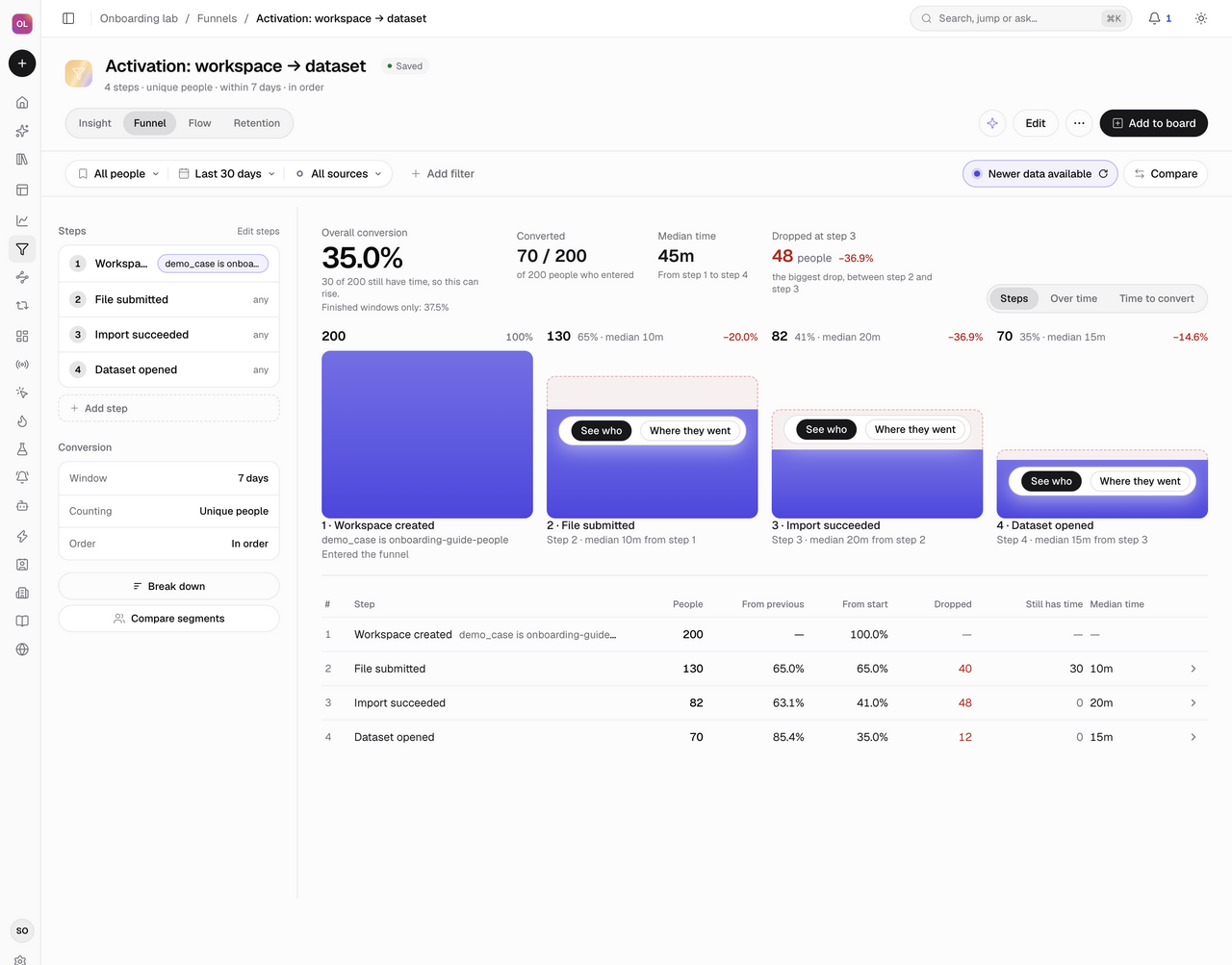
We ran the sample in a local ClickClacks project using the ingestion validator and real analytics queries. The saved funnel returned 200 → 130 → 82 → 70: 35% overall conversion. After the older cohort’s windows finished, the report showed 37.5% for finished windows and 30 people still pending. Resending the saved batch left 582 stored events; transport retries did not add duplicates.
The drop-off drawer contained exactly 48 people between submission and success: 18 whose last recorded event was Import validation failed and 30 with no later event. With all 130 submitting people included, that drop is 36.9%. The 40% used earlier is 48 out of the 120 submitting people in the finished cohort. Both are correct for their stated denominator.
Count workspaces when teammates share the work
The download also includes 20 workspaces where an owner creates the workspace, an operator imports the file, and an analyst opens the dataset. Count people and the funnel is 20 → 0 → 0 → 0: no owner personally completed the remaining steps. Count workspaces and the same events become 20 → 16 → 12 → 10, or 50% activation.
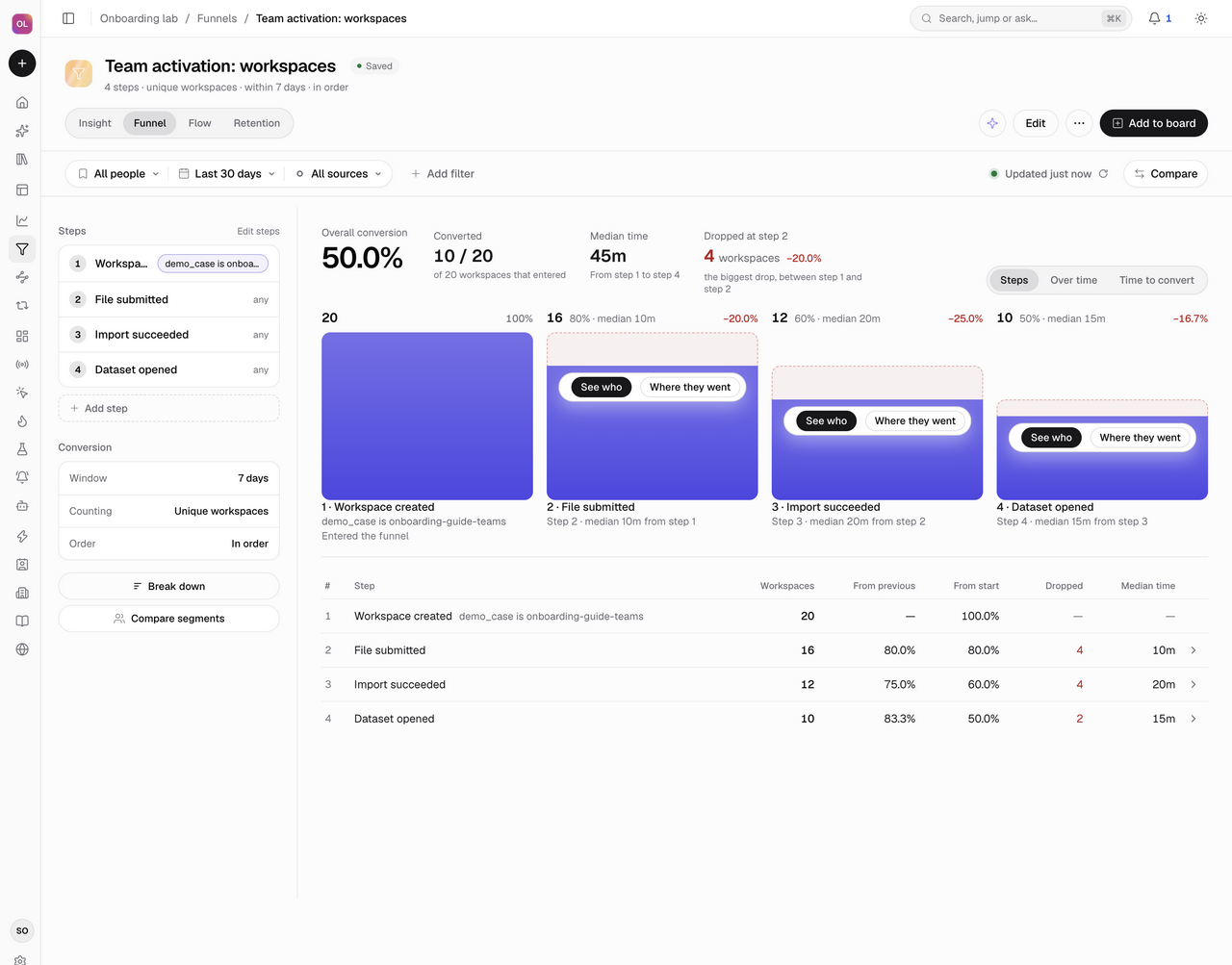
Keep each teammate’s own identity and attach the workspace through properties.$groups.workspace on every event. Choose that group type under Count by; an ordinary workspace_id property does not change the counting unit. The team example shows the event shape and saved result.
For background imports, persist the submitting user and workspace on the job. Record a success event when the job actually commits its output. Save the event in an outbox with the state change, and preserve its ID and occurrence time across delivery retries. A corrected file is a new application attempt with a new event ID. The walkthrough includes this implementation pattern and response-handling rules.
Choose one change with an expected result
For the missing-header example, a reasonable change is a downloadable sample file and a validation message that names the required header. The hypothesis is that more workspaces recover from that specific error and complete an import within seven days.
Measure that transition directly. Keep overall dataset opening as the outcome and monitor new failures as a guardrail. A validation change that suppresses errors by accepting unusable data might make one step look better while leaving users with a worse result.
Document the release date and compare complete cohorts with stable definitions. If you can run a sound randomized test, decide assignment and evaluation rules before launch. Otherwise, describe a before-and-after result as observational and check for changes in file mix, acquisition, or tracking.
Make the next review easy to follow
Bring four things: the required route, the counted drop-off, the supporting path evidence, and the next action. “48 of 120 submitting workspaces did not complete an import” is a finding. “Missing-header errors explain 18 of those cases” is a narrower finding. “Improve the template and recovery message” is a proposal.
Use the funnel guide to locate the transition and inspect the expired-window audience. Opening Flows starts a path exploration with its own session rules and filter behavior; its counts may differ from the funnel drawer. Keep the cohort, window, counting unit and unresolved cases beside the analysis.
After the change, return to the same question: can more new workspaces open a useful dataset? That is the outcome the onboarding work was meant to support, even if the path they take becomes shorter or no longer resembles your original checklist.
Keep reading
All posts
Guides6 min read
How to interpret cohort analysis without misreading the grid
Learn how to read cohort rows and columns, distinguish pending periods from zero activity, and compare retention fairly using an annotated worked example.
Guides6 min read
Conversion funnel optimization for a SaaS sign-up flow
Find and validate a SaaS sign-up obstacle, calculate step losses, estimate a change transparently, and evaluate the result with a useful downstream guardrail.
Guides6 min read
A client reporting template that explains what to do next
Copy a practical client reporting template with comparable results, clear limitations, and an owned next action. Includes an illustrative conversion-rate example.