How to interpret cohort analysis without misreading the grid
Learn how to read cohort rows and columns, distinguish pending periods from zero activity, and compare retention fairly using an annotated worked example.
The ClickClacks team · 6 min read
On this page 8 sections
- Read the definition before reading the colors
- Translate one cell into a sentence
- Read across to understand one cohort
- Read down to compare groups at the same age
- Treat missing time differently from zero activity
- Check cohort sizes before comparing percentages
- Use patterns to form narrower questions
- Write the conclusion with its limits
To interpret cohort analysis, read across a row to see how one group behaves as it ages, then read down a column to compare different groups at the same age. Before drawing a conclusion, check who entered each group, what counts as returning, and whether every cell has had time to fill.
A cohort is a group defined by a shared characteristic or starting event. In a retention grid, that is often the week people first completed a meaningful action. The colors summarize a calculation; they do not explain why users returned or stopped.
The example below is fictional. It uses four groups of 100 users to make the arithmetic easy to follow, not to suggest a normal retention rate for a SaaS product.
Read the definition before reading the colors
Suppose a planning app groups users by the calendar week in which they first complete a task. Its return action is another completed task. The chart uses UTC calendar weeks running Monday through Sunday. Week 1 means the first calendar week after the entry week, not the first seven days after each individual’s entry timestamp.
Those choices matter. Someone who starts on Sunday has a shorter entry week than someone who starts on Monday. An elapsed-time chart would instead count periods from each person’s own start time. Neither convention is inherently wrong, but mixing them can make reports disagree.
This retention timing reference explains the distinction between calendar periods and elapsed intervals. Confirm which convention your report uses and include it in the caption. Also check whether a return means activity in a specific period or activity on or after that period.
Translate one cell into a sentence
Our first cohort contains 100 users. In Week 1, 40 complete another task. Its Week 1 retention is therefore 40%. In Week 2, 30 complete a task, giving 30% retention for that interval. Week 3 contains 25 returning users, or 25%.
Read the Week 2 cell as: “Of the 100 users who first completed a task in this entry week, 30 completed a task during the second calendar week after it.” That sentence includes the denominator, start condition, return action, and time interval.
It does not mean 30% of the Week 1 returners came back. It also does not mean the remaining 70 users canceled a subscription. They did not perform this particular return action in this particular interval. They might still be customers, or they might return later.
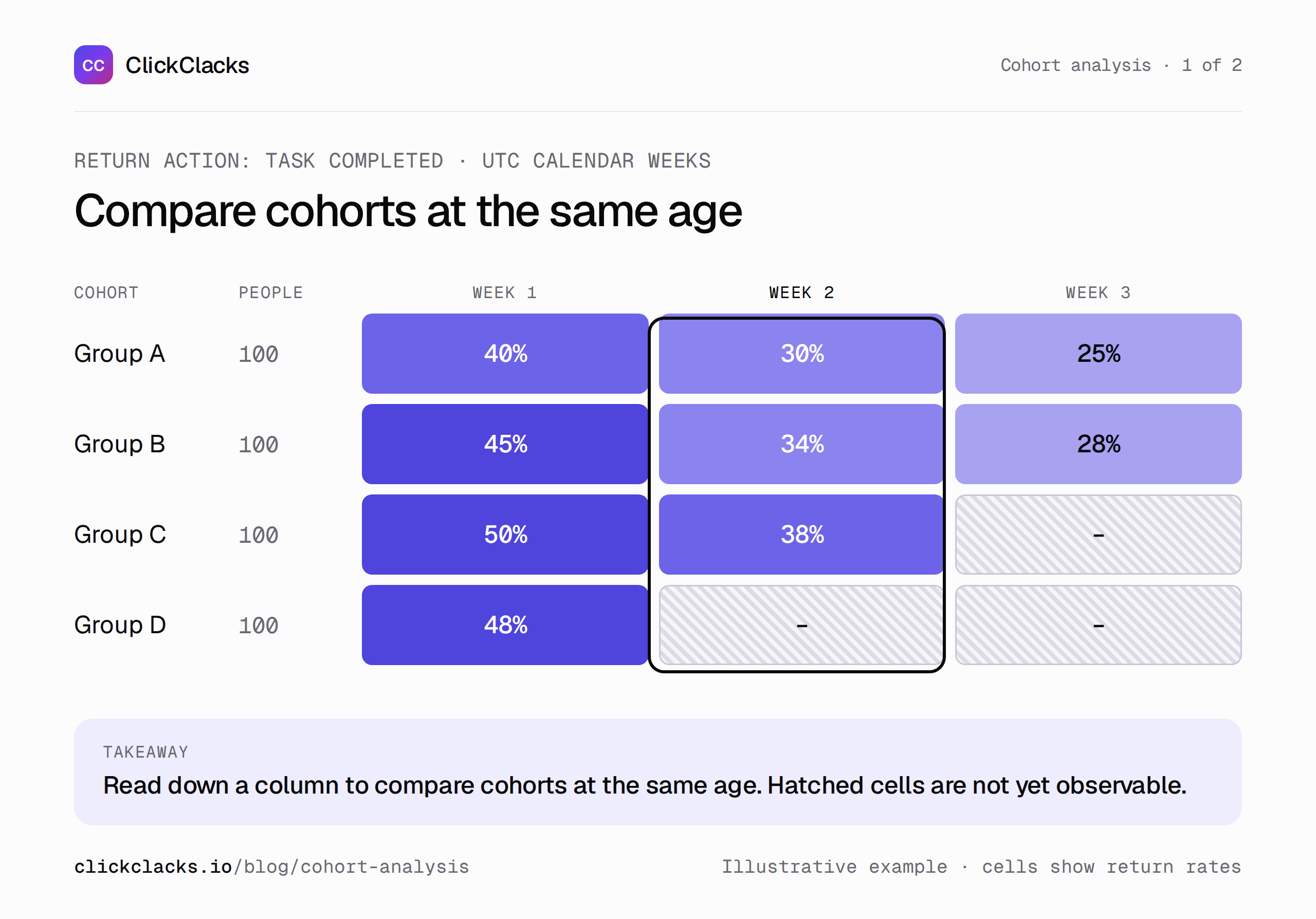
Exact-interval retention. Each row starts with 100 users. Blank cells are not yet observable.
Read across to understand one cohort
The first row reads 40%, 30%, and 25% across Weeks 1 to 3. That describes a declining share performing the return action in each interval. It does not prove the product gets worse with age, and the percentages do not identify the same returning users in every column.
Someone could skip Week 1 and return in Week 2. Another person could return in Week 1 and never again. An exact-interval retention curve can rise after a decline because previously absent people become active again. It is not a cumulative survival curve in which leaving is permanent.
Ask whether the interval matches the product’s natural use. A payroll workflow may have a monthly rhythm. A weekly return measure could look weak between payroll runs even when the product reliably does its job. Choose the cadence based on the task, then keep it stable for comparisons.
Read down to compare groups at the same age
Our next cohorts have Week 1 retention of 45%, 50%, and 48%. The first three complete cohorts have Week 2 retention of 30%, 34%, and 38%. These are the comparisons that can help investigate whether newer groups are returning more often at equivalent ages.
Do not compare the newest cohort’s Week 1 result with the oldest cohort’s Week 3 result and call the difference an improvement. That compares different points in the lifecycle. People just starting and people three weeks in have had different opportunities and reasons to return.
Even equal-age comparisons need context. Newer cohorts may contain more invited teammates, different acquisition channels, or customers with different jobs. A product release may coincide with those changes without causing the observed difference. Record likely explanations as hypotheses until you have evidence to separate them.
Treat missing time differently from zero activity
The fourth cohort has completed Week 1, but Weeks 2 and 3 have not finished. Leave those cells blank or mark them pending. Zero means the interval was fully observed and nobody returned. Pending means the result does not yet exist.
The third cohort has completed Week 2 but not Week 3. The second cohort has completed all three periods and shows 28% in Week 3. This triangular shape is expected when newer groups have shorter histories. Filling it with zeros creates an artificial collapse in recent retention.
Data gaps are a third state. If event collection failed during a period, the interval existed but the observations may be incomplete. Do not hide that behind the same pending label used for future time. Annotate the incident and withhold conclusions that depend on the missing data.
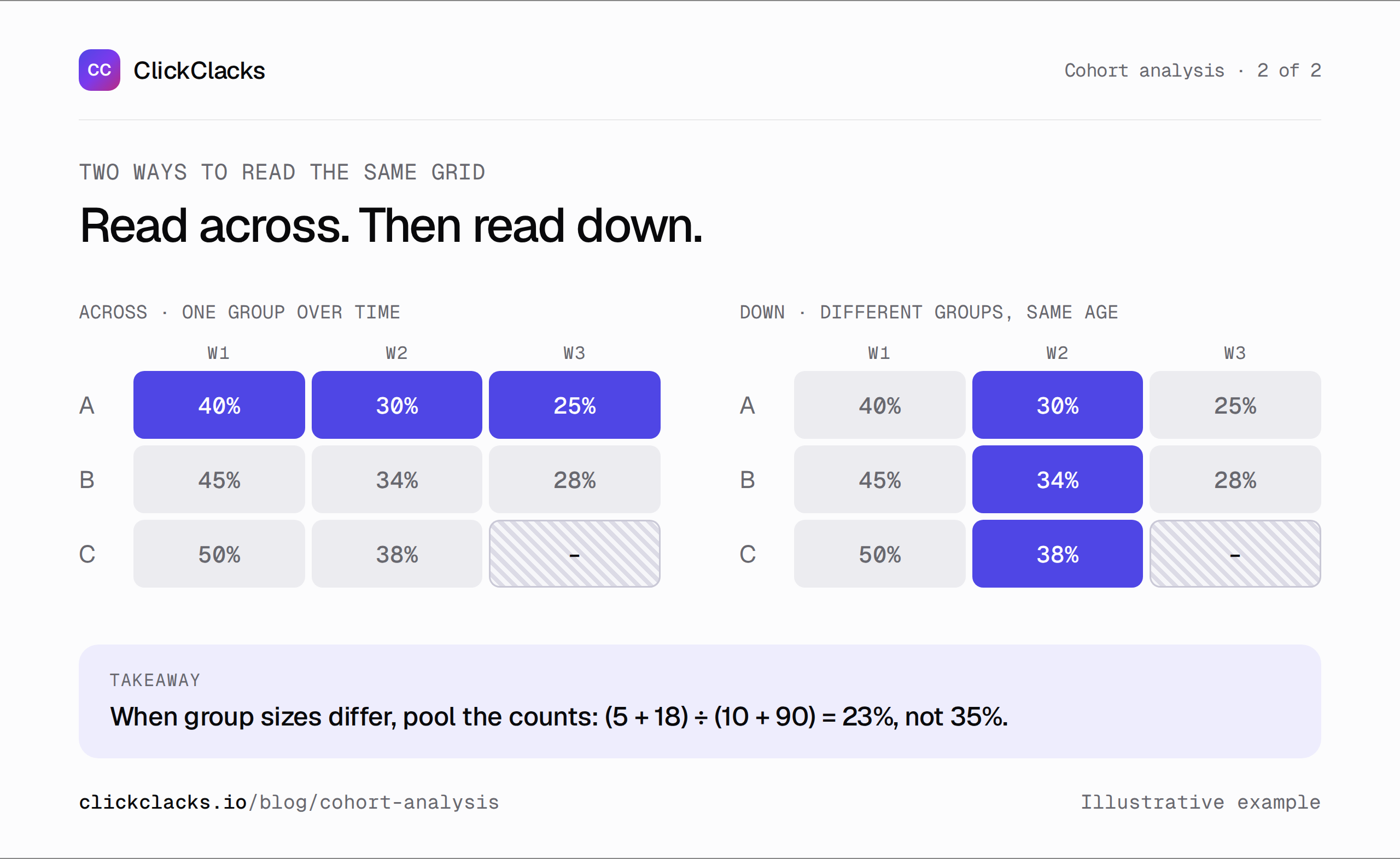
A fair comparison uses the same age, definition, and opportunity to return.
Check cohort sizes before comparing percentages
Equal row sizes make this teaching example simple. Real cohorts often differ. A 50% return rate based on two users carries much less information than 50% based on 2,000. Show the starting count beside each row and inspect the numerator behind a surprising cell.
When combining cohorts, add the returning counts and divide by the combined eligible counts. Do not average row percentages unless the rows happen to have equal weight. For example, 5 returners from 10 users and 18 from 90 users combine to 23 from 100, or 23%, not the 35% average of 50% and 20%.
If a segment is tiny, treat its pattern as a lead for investigation. Avoid claiming a meaningful improvement from a color change without considering sample size, variation, and whether the measurement was stable.
Use patterns to form narrower questions
An early drop might suggest that the first task delivers too little lasting value, but it could also reflect one-off users who never intended to return. Compare acquisition intent or user role before designing a blanket reactivation campaign.
A decline affecting several cohorts during the same calendar week may point to a shared incident, holiday, or tracking change. Translate relative-age columns back into actual dates to investigate it. A diagonal pattern in the grid is a useful clue, not a diagnosis by itself.
A later rise might reflect a recurring task or reactivation. Look at which users returned and what they did. Calling every upward bend a successful habit would skip the explanation the team needs.
Write the conclusion with its limits
A useful conclusion is specific: “Week 2 task retention increased from 30 of 100 users to 38 of 100 across these entry cohorts; the newest cohort cannot yet be compared at Week 3.” Follow it with the next check, such as whether the acquisition mix changed.
The retention page introduces the product’s cohort analysis. Use it alongside a written definition of your start action, return action, unit, interval, and timezone. Save that definition with the chart so another reader can reconstruct what every cell means.
The goal of reading a cohort grid is to choose a better question about returning behavior. Once you can explain a cell in a full sentence and compare groups at the same age, the colors become a helpful summary instead of an invitation to guess.
Keep reading
All posts
Guides10 min read
User onboarding analytics: find where new users get stuck
Find the onboarding step that prevents activation, reproduce a worked funnel with sample events, and separate pending users from real drop-offs.
Guides6 min read
Conversion funnel optimization for a SaaS sign-up flow
Find and validate a SaaS sign-up obstacle, calculate step losses, estimate a change transparently, and evaluate the result with a useful downstream guardrail.
Guides6 min read
A client reporting template that explains what to do next
Copy a practical client reporting template with comparable results, clear limitations, and an owned next action. Includes an illustrative conversion-rate example.